Subject: How To Open a .VNW Files
This is another problem that u might encounter when downloading a movie....take note...hehe..
Sometimes while downloading a movie file using part file .001, .002 & so forth; u will faced a problem which is the extracted file that u just decoded end up to be a new unknown movie format...
(One of it is .VNW) You’ll find many files with .vnw extension if you download movies or softwares or such other things with .VNW extensions from any file sharing media like mediafire.com.
Actually, it is an alternate format version of archived file. (From my understanding lah kan...hehe...)
Here I gonna show u the steps to deal with it:
1. Rename all The .vnw files to .rar
Example, if the downloaded file’s name is "movie.vnw" then rename it to "movie.rar" .
2. After that, use Winrar to extract it. You can download Winrar by google it...hoho...
3. Make sure that all parts of the movie are in the same folder. Otherwise, no effect would be
seen.
4. Then right click on the Part 1 File. Then Choose "Extract Files Here".
After that you will find the extracted movie on the same folder(where the downloaded files
are).
DONE !!! Enjoy ur movie then...daa.... ^^V
NOTE: In my opinion, u rarely encounter with this kind of problem. But it worth to know it at least...hehe...
Ok...until then,Bye^^

Showing posts with label IT Projectz. Show all posts
Showing posts with label IT Projectz. Show all posts
Thursday, September 8, 2011


Wednesday, September 7, 2011
Movie Quality Format TUTORIAL
A lot of question arise among my friend about this not so long ago...
What Does DVDRip, DVDSCR, CAMRip, R5, TSRip stands for? what it's mean? How about BDRIP? BRRIP? PPVRIP?
This might confusing certain people who skilled in downloading a movie but know nothing about it. To everyone who once wonder what all of that mean, well, those are actually a Video(Movie) Quality format.
As for u guys, it is very informative when u know it, then u will know how to choose it.
Bcoz you don't want to waste ur time downloading a movie only to find out the quality of the movie is far worse than u expected.
This r some of Movie Quality Format that i know,downloaded,experienced & found throughout the vast internet resources.
1) DVDRip: It is a copy of a original DVD. The quality is excellent (DVD Quality). DVDRip Quality is ready to download when Original DVD is in the market. DVDrips are released in SVCD and DivX/XviD.
2) DVDScr: Or DVD Screener, usually is a copy of a PROMO Dvd. The DVDScr is out before the original DVD is in the market. Video usually comes with water marks in the video, clock counters and legends. Sometimes in some parts of the Movie video turns in black and white.
Quality is good.
3) R5: Refers to a specific format of DVD released in DVD Region 5, the former Soviet Union, and bootlegged copies of these releases that are distributed on the Internet. In an effort to compete with movie piracy, the movie industry chose to create a new format for DVD releases that could be produced more quickly and less expensively than traditional DVD releases. Quality is good because video is ripped directly from a DVD.
4) CAMRip: A cam is a theater rip usually done with a digital video camera. A mini tripod is sometimes used, but a lot of the time this wont be possible, so the camera make shake. Also seating placement isn't always idle, and it might be filmed from an angle. Quality is awful.
5) TSRip: Or Telesync, is the same spec as a CAM except it uses an external audio source. A direct audio source does not ensure a good quality audio source, as a lot of background noise can interfere. Quality is awful.
6) TCRip: A telecine machine copies the film digitally from the reels. Sound and picture should be very good, but due to the equipment involved and cost telecines are fairly uncommon. Quality is regular.
7) VHSRip: U rarely seen this type. It exist by transferred off a retail VHS, mainly skating/sports videos and XXX releases.
8) BRrip: BRRip & BDRip; both use a bluray disc as a medium of movies rip out. An XviD encode from a Blu-Ray release (i.e. a 1080p *.mkv file). BRRips are superior to DVDRips, they are normally released in 720p resolution, since standalone DivX (*.avi) players do not support anything higher than this anyways. They should not be confused with genuine Blu-Ray rips in 1080p, which are usually done in native Blu-Ray files, or as H.264 *.mkv files.
9) BDrip: BRRip & BDRip; both use a bluray disc as a medium of movies rip out. An XviD encode directly from a source Blu-Ray disk. BRRips are superior to DVDRips, they are normally released in 720p resolution, since standalone DivX (*.avi) players do not support anything higher than this anyways. They should not be confused with genuine Blu-Ray rips in 1080p, which are usually done in native Blu-Ray files, or as H.264 *.mkv files.
#The only difference between this 2 Quality Format is that since BRRips are taken directly from a release that has already been ripped from a Blu-Ray disk (so it’s not a direct source), if there was a problem with the original .mkv, such as bad AR (aspect ratio) then it’ll be transferred to the BRRip, as well. True BDRips come straight from a Blu-Ray disk, which eliminates any problem with a middleman. However, this is somewhat of a moot point - the person/group responsible for the rip is seemingly more important to the end-product quality.
10)HDRip: It is a High Definition Rip which is refer to a ripped movie that is originated from a high quality source.
11)PPVRIP: PPVRip is a recording of a Newer Release movie played on a Pay-Per-View television usually sourced in Motels, Airplanes, High Class Lobbies, etc. PPVRip stands for: Pay Per View Rip. Not all PPVRips are sourced at the above locations, some have known to come from Movie Executives office televisions or Child Care centers located at larger Movie Studios, among other less obvious sources.
12)TVRip: TV episode that is either from Network (capped using digital cable/satellite boxes are preferable) or PRE-AIR from satellite feeds sending the program around to networks a few days earlier (do not contain "dogs" but sometimes have flickers etc) Some programs such as WWF Raw Is War contain extra parts, and the "dark matches" and camera/commentary tests are included on the rips. PDTV is capped from a digital TV PCI card, generally giving the best results, and groups tend to release in SVCD for these. VCD/SVCD/DivX/XviD rips are all supported by the TV scene.
13)WORKPRINT (WP): U rarely seen this type. This format is a workprint is a copy of the film that has not been finished. It can be missing scenes, music, and quality can range from excellent to very poor. Some WPs are very different from the final print (Men In Black is missing all the aliens, and has actors in their places) and others can contain extra scenes (Jay and Silent Bob) . WPs can be nice additions to the collection once a good quality final has been obtained.
14)DDC: U rarely seen this type. DDC stands for "Digital Distribution Copy" and it is basically the same as a Screener, but sent digitally (email/ftp/http/etc.) to companies instead of via the postal system. This makes distribution cheaper. Its quality is lower than one of a R5 but Higher than a Cam or A TS.
15)DivX Re-Enc: I rarely seen this too. A DivX re-enc is a film that has been taken from its original VCD source, and re-encoded into a small DivX file. Most commonly found on file sharers, these are usually labeled something like Film.Name.Group(1of2) etc. Common groups are SMR and TND. These aren't really worth downloading, unless you're that unsure about a film u only want a 200mb copy of it. Generally avoid.
16)Watermarks: U rarely seen this type. A lot of films come from Asian Silvers/PDVD (see below) and these are tagged by the people responsible. Usually with a letter/initials or a little logo, generally in one of the corners. Most famous are the "Z" "A" and "Globe" watermarks.
17)Asian Silvers / PDVD: These are films put out by eastern bootleggers, and these are usually bought by some groups to put out as their own. Silvers are very cheap and easily available in a lot of countries, and its easy to put out a release, which is why there are so many in the scene at the moment, mainly from smaller groups who don't last more than a few releases. PDVDs are the same thing pressed onto a DVD. They have removable subtitles, and the quality is usually better than the silvers. These are ripped like a normal DVD, but usually released as VCD.
There may have been a lot more Quality Format out there that i might not listed.Suggest 1 please....hehehe...
Ok....so, there r 17 Movie Quality Format here; now i'm gonna rank it in descending order by Best to the worse one.
Oh ya, this is my personal opinion k (based on my experience), u may argue if u like to....hoho~
(IN DESCENDING ORDER OF BEST TO THE WORSE ONE)
1.HDRIP (Since it is a High Definition rip, so, it should be ultimately perfect & of course, worth to dowload.)
2.BDRIP
3.BRRIP
4.DVDRIP,R5 (both format is about equal in Quality)
5.VHSRIP
6.DVDScr
7.TVRIP (TV...well,u know it!)
8.TCRIP (Never seen this one before, but it reasonable to rank it at this point)
9.PPVRIP (This type appear recently, not so good but it is better than nothing)
10.TSRIP,CAMRIP (last choice, better not choose to download this one if other better format is available but this Quality type often release first)
11.DDC,Divx Re-enc,Watermarks,PDVD (Rank at bottom bcoz i never encounter with this Quality type before.)
What Does DVDRip, DVDSCR, CAMRip, R5, TSRip stands for? what it's mean? How about BDRIP? BRRIP? PPVRIP?
This might confusing certain people who skilled in downloading a movie but know nothing about it. To everyone who once wonder what all of that mean, well, those are actually a Video(Movie) Quality format.
As for u guys, it is very informative when u know it, then u will know how to choose it.
Bcoz you don't want to waste ur time downloading a movie only to find out the quality of the movie is far worse than u expected.
This r some of Movie Quality Format that i know,downloaded,experienced & found throughout the vast internet resources.
1) DVDRip: It is a copy of a original DVD. The quality is excellent (DVD Quality). DVDRip Quality is ready to download when Original DVD is in the market. DVDrips are released in SVCD and DivX/XviD.
2) DVDScr: Or DVD Screener, usually is a copy of a PROMO Dvd. The DVDScr is out before the original DVD is in the market. Video usually comes with water marks in the video, clock counters and legends. Sometimes in some parts of the Movie video turns in black and white.
Quality is good.
3) R5: Refers to a specific format of DVD released in DVD Region 5, the former Soviet Union, and bootlegged copies of these releases that are distributed on the Internet. In an effort to compete with movie piracy, the movie industry chose to create a new format for DVD releases that could be produced more quickly and less expensively than traditional DVD releases. Quality is good because video is ripped directly from a DVD.
4) CAMRip: A cam is a theater rip usually done with a digital video camera. A mini tripod is sometimes used, but a lot of the time this wont be possible, so the camera make shake. Also seating placement isn't always idle, and it might be filmed from an angle. Quality is awful.
5) TSRip: Or Telesync, is the same spec as a CAM except it uses an external audio source. A direct audio source does not ensure a good quality audio source, as a lot of background noise can interfere. Quality is awful.
6) TCRip: A telecine machine copies the film digitally from the reels. Sound and picture should be very good, but due to the equipment involved and cost telecines are fairly uncommon. Quality is regular.
7) VHSRip: U rarely seen this type. It exist by transferred off a retail VHS, mainly skating/sports videos and XXX releases.
8) BRrip: BRRip & BDRip; both use a bluray disc as a medium of movies rip out. An XviD encode from a Blu-Ray release (i.e. a 1080p *.mkv file). BRRips are superior to DVDRips, they are normally released in 720p resolution, since standalone DivX (*.avi) players do not support anything higher than this anyways. They should not be confused with genuine Blu-Ray rips in 1080p, which are usually done in native Blu-Ray files, or as H.264 *.mkv files.
9) BDrip: BRRip & BDRip; both use a bluray disc as a medium of movies rip out. An XviD encode directly from a source Blu-Ray disk. BRRips are superior to DVDRips, they are normally released in 720p resolution, since standalone DivX (*.avi) players do not support anything higher than this anyways. They should not be confused with genuine Blu-Ray rips in 1080p, which are usually done in native Blu-Ray files, or as H.264 *.mkv files.
#The only difference between this 2 Quality Format is that since BRRips are taken directly from a release that has already been ripped from a Blu-Ray disk (so it’s not a direct source), if there was a problem with the original .mkv, such as bad AR (aspect ratio) then it’ll be transferred to the BRRip, as well. True BDRips come straight from a Blu-Ray disk, which eliminates any problem with a middleman. However, this is somewhat of a moot point - the person/group responsible for the rip is seemingly more important to the end-product quality.
10)HDRip: It is a High Definition Rip which is refer to a ripped movie that is originated from a high quality source.
11)PPVRIP: PPVRip is a recording of a Newer Release movie played on a Pay-Per-View television usually sourced in Motels, Airplanes, High Class Lobbies, etc. PPVRip stands for: Pay Per View Rip. Not all PPVRips are sourced at the above locations, some have known to come from Movie Executives office televisions or Child Care centers located at larger Movie Studios, among other less obvious sources.
12)TVRip: TV episode that is either from Network (capped using digital cable/satellite boxes are preferable) or PRE-AIR from satellite feeds sending the program around to networks a few days earlier (do not contain "dogs" but sometimes have flickers etc) Some programs such as WWF Raw Is War contain extra parts, and the "dark matches" and camera/commentary tests are included on the rips. PDTV is capped from a digital TV PCI card, generally giving the best results, and groups tend to release in SVCD for these. VCD/SVCD/DivX/XviD rips are all supported by the TV scene.
13)WORKPRINT (WP): U rarely seen this type. This format is a workprint is a copy of the film that has not been finished. It can be missing scenes, music, and quality can range from excellent to very poor. Some WPs are very different from the final print (Men In Black is missing all the aliens, and has actors in their places) and others can contain extra scenes (Jay and Silent Bob) . WPs can be nice additions to the collection once a good quality final has been obtained.
14)DDC: U rarely seen this type. DDC stands for "Digital Distribution Copy" and it is basically the same as a Screener, but sent digitally (email/ftp/http/etc.) to companies instead of via the postal system. This makes distribution cheaper. Its quality is lower than one of a R5 but Higher than a Cam or A TS.
15)DivX Re-Enc: I rarely seen this too. A DivX re-enc is a film that has been taken from its original VCD source, and re-encoded into a small DivX file. Most commonly found on file sharers, these are usually labeled something like Film.Name.Group(1of2) etc. Common groups are SMR and TND. These aren't really worth downloading, unless you're that unsure about a film u only want a 200mb copy of it. Generally avoid.
16)Watermarks: U rarely seen this type. A lot of films come from Asian Silvers/PDVD (see below) and these are tagged by the people responsible. Usually with a letter/initials or a little logo, generally in one of the corners. Most famous are the "Z" "A" and "Globe" watermarks.
17)Asian Silvers / PDVD: These are films put out by eastern bootleggers, and these are usually bought by some groups to put out as their own. Silvers are very cheap and easily available in a lot of countries, and its easy to put out a release, which is why there are so many in the scene at the moment, mainly from smaller groups who don't last more than a few releases. PDVDs are the same thing pressed onto a DVD. They have removable subtitles, and the quality is usually better than the silvers. These are ripped like a normal DVD, but usually released as VCD.
There may have been a lot more Quality Format out there that i might not listed.Suggest 1 please....hehehe...
Ok....so, there r 17 Movie Quality Format here; now i'm gonna rank it in descending order by Best to the worse one.
Oh ya, this is my personal opinion k (based on my experience), u may argue if u like to....hoho~
(IN DESCENDING ORDER OF BEST TO THE WORSE ONE)
1.HDRIP (Since it is a High Definition rip, so, it should be ultimately perfect & of course, worth to dowload.)
2.BDRIP
3.BRRIP
4.DVDRIP,R5 (both format is about equal in Quality)
5.VHSRIP
6.DVDScr
7.TVRIP (TV...well,u know it!)
8.TCRIP (Never seen this one before, but it reasonable to rank it at this point)
9.PPVRIP (This type appear recently, not so good but it is better than nothing)
10.TSRIP,CAMRIP (last choice, better not choose to download this one if other better format is available but this Quality type often release first)
11.DDC,Divx Re-enc,Watermarks,PDVD (Rank at bottom bcoz i never encounter with this Quality type before.)
Wednesday, June 16, 2010
Somethin' New stuff....How To Add Shoutmix in Your Blog !
Hey....Today I've learn somethin' new....a gud stuff...goodie...goodie....hehe...
Ok, I was eager to share with u guyz on how to place the "shoutmix" in ur blog...Ok, see through
to the step that I will give k....have a nice day...
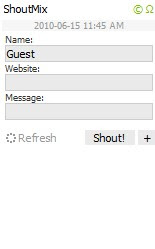
The above pic. is the basic of the typical "shoutmix" box...U can manage ur own version later on in the setting page on its website....
Step 1:
Go to http://www.shoutmix.com or u can simply google it, and sign up a new account. It's free..
unless u want the premium one that have more functionability...
Step 2 :
See through to the site to find out what it is...see HELP menu to learn on how to use it for newbie. Set ur own version of setting, label, box width, box length & so on.
Step 3:
Then go to ur blog, sign in....
Step 4:
First, go to the Design panel, On the Top Right (based on ur sight)...
Step 5:
Second, Add Page Element, see "Add a gadget", choose it at wherever u want it to be...
Step 6:
Next, when u "Add a gadget", u can see various type of gadget listed there, on the basic type gadget, choose HTML/javascript....
~>function as to add third-party functionability or other code to your blog.
Step 7:
Go back to shoutmix website & Click on 'Get Code' from it then Copy and Paste the code to your
Page Element under the title. Note that the title, u can put whatever u want...
Ok, done!!!
Note:for box width, u can juz change the current one on the coding that u "copy/paste" if the box width not appropriate with ur page width...ok that's all....take time ^___~
Ok, I was eager to share with u guyz on how to place the "shoutmix" in ur blog...Ok, see through
to the step that I will give k....have a nice day...

The above pic. is the basic of the typical "shoutmix" box...U can manage ur own version later on in the setting page on its website....
Step 1:
Go to http://www.shoutmix.com or u can simply google it, and sign up a new account. It's free..
unless u want the premium one that have more functionability...
Step 2 :
See through to the site to find out what it is...see HELP menu to learn on how to use it for newbie. Set ur own version of setting, label, box width, box length & so on.
Step 3:
Then go to ur blog, sign in....
Step 4:
First, go to the Design panel, On the Top Right (based on ur sight)...
Step 5:
Second, Add Page Element, see "Add a gadget", choose it at wherever u want it to be...
Step 6:
Next, when u "Add a gadget", u can see various type of gadget listed there, on the basic type gadget, choose HTML/javascript....
~>function as to add third-party functionability or other code to your blog.
Step 7:
Go back to shoutmix website & Click on 'Get Code' from it then Copy and Paste the code to your
Page Element under the title. Note that the title, u can put whatever u want...
Ok, done!!!
Note:for box width, u can juz change the current one on the coding that u "copy/paste" if the box width not appropriate with ur page width...ok that's all....take time ^___~
Subscribe to:
Comments (Atom)
